General tool list
The bitterness of poor quality remains long after the sweetness of meeting the schedule has been forgotten.
This article will enumerate some tools that might help you test in a particular way or become more productive in your everyday work. Don't think that you have to use all of them all the time. Tools should always help and never get in the way.
Testing stack
These are some of our dearest tools.
Some will be briefly mentioned below and others will be covered through other articles of this Handbook.
Use them according to the demands of your particular project.
- Test case management: Testrail
- Web/mobile cloud testing: Browserstack
- Mobile - UI Automation: Appium
- Web - UI Automation: Selenium
- API - Functional Testing: Postman
- API - Load testing: k6
- MITM: Charles, Proxyman
Services
Appbot
The tool we use for collecting and monitoring user app reviews.
Check it out here.
Browserstack Live / App Live
We have a Browserstack license which enables you to test our mobile ("App Live") and web apps ("Live") remotely on real devices. Pretty cool, right?
Check it out here.
Browserstack Speedlab
For a quick frontend performance check, you can use the Browserstack Speedlab.
Crashlytics
Crashlytics is a part of Fabric and used for getting crash/error logs from mobile apps.
Google Analytics
One of the more important analytics tools we use on some projects.
Google Firebase
Another analytics tool that is so much more. Google started integrating Fabric tools into Firebase after buying the company so you will see Crashlytics there as well.
Google Dev Console & iTunes Connect
Both are dev dashboards for their respective platforms.
See what they are all about in this blog post by Vanja.
If you need access, talk to your team lead.
Invision
A web interface for browsing design files and prototypes.
Zeplin
A web interface for browsing designs made in Sketch.
Chrome tools and extensions
Bug Magnet
Bug Magnet is a Google Chrome extension.
Just right-click on any editable item on the page and insert lorems, names, numbers, currencies, payment cards, etc. Check boundaries and edge cases for exploratory testing.
Chrome Dev Tools
The best thing since sliced bread. Read a short tutorial in our own Handbook.
You can use it to catch errors, measure response times, inspect elements, simulate a mobile device, and much more.
ChroPath
A Google Chrome extension that will help you locate web elements when doing UI automation.
Clear Sessions
A Google Chrome extension that will clear all session/cookie data for a particular web page.
JSONView
A Google Chrome extension that will prettify your JSONs when viewing them in Chrome.
Markdown Viewer
Helps you view Markdown files in Chrome.
Screencastify
An extension for easily creating tab screencasts in Google Chrome.
Android and iOS tools
Android File Transfer
Used for transferring files between an Android phone and a macOS system. Get it here.
Android Debug Bridge (adb)
Used for communicating with your Android device via the terminal.
Chuck and Loggie
- Chuck is used for inspecting network traffic in Android apps. You can access it from the notifications drawer when the app is running.
- Loggie is a tool made by our own Filip Beć used for inspecting network traffic in iOS apps. Once the app is running and in foreground, you can access it by shaking the phone. :)
Both are useful for inspecting network traffic. If the apps you are testing do not include them, talk to your developers.
FakeGPS and Lockito (Android)
Tools for mocking your GPS location.
Google Authenticator
For keeping your 2FA credentials.
Instruments (iOS)
Tools for inspecting the performance of your app (and much more). Requires XCode.
Inware and Introspect (Android)
Find all information about your Android device.
logcat and pidcat (Android)
Both are used for examining Android's device log. Pidcat is just a fancier logcat developed by Saint Jake Wharton.
In order to use it, you will have to install the Android SDK.
You can get pidcat here. Find more info on using pidcat in our own Handbook.
Use pidcat on debug builds in order to get fetch stack traces and network traffic, among other things.
Nexus Root Toolkit
Used for changing ROMs on Nexus devices.
Scrcpy
Use scrcpy for easy Android screencasting.
Shortcuts app (iOS)
For creating and executing scripts on your iOS device.
Stetho
Stetho is used for examining network traffic, layout, etc. in Android apps via Chrome.
To use it:
Connect your Android phone to the laptop
Navigate to
chrome://inspectClick the "Inspect" button to begin
You have to ask developers to add it to the app.
Tunnelbear or UrbanVPN
For connecting to VPNs in various countries. Our account password for Tunnelbear is in 1password. UrbanVPN is free so feel free to sign up (follow this link for more info about this awesome VPN).
Other tools
1Password
A password manager where we keep credentials for all shared accounts.
Alfred
An advanced "Spotlight" for quickly executing certain actions.
Bash
Command language and shell. See this dev.to tutorial.
Broken Link Checker
Dr. Link Check is a tool that finds links in HTML documents and CSS files. For finding broken and malicious links.
Charles
A proxy app used for examining network traffic between your device and a server by staging a man-in-the-middle attack.
Copyclip
For accessing your clipboard history.
Ghostlab
For parallel crossbrowser testing on several physical devices.
Google Keep / Simplenote
For taking notes.
IDEs and Text editors
- PyCharm - Python
- Sublime Text
- Visual Studio Code
MacDown
For quickly viewing and editing Markdown files.
PhraseExpress
For pasting templates by entering a simple piece of text. E.g. enter "bugtemplate" and get an entire bug report template that will replace that entered string so you never have to type out the entire thing again.
Proxyman
It's like Charles, but a bit more fancy.
Send Anywhere
For sending files between mobile and desktop devices.
Skitch / Monosnap
For taking screenshots.
Spectacle
For managing your windows.
Todoist
For managing your own tasks.
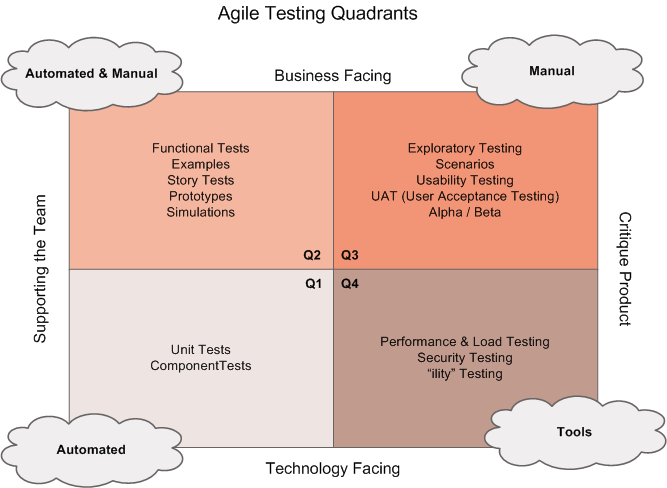
Testing quadrant
For more on tools and testing and to not make this whole article just another dead list, read up on agile testing quadrants.